
Film Emulation Lightroom Presets
Analogue film, photographic color and the digital darkroom
There are many reasons why photographers continue to be drawn to film. Nostalgia is certainly one of them, but the interest goes deeper than that. Film has a particular way of translating light and color into an image, and different materials can produce remarkably different interpretations of the same scene. This is where our interest in film emulation begins.
The Digital Darkroom creates Lightroom presets and profiles inspired by analogue film, historic color processes and traditional photographic printing. Some collections begin with the characteristics of a particular type of film, while others are informed by darkroom techniques, printing processes or the color palette of a particular period in photographic history.
We develop these tools through repeated testing on different photographs and under very different lighting conditions. The intention is to create a useful foundation for further editing, with enough character to suggest a direction while leaving room for the photographer to make the image their own.
A digital image does not have to look digital
Modern digital cameras are extraordinarily capable. They record an enormous amount of information, produce remarkably clean files and allow us to work in situations that would once have been extremely difficult. At the same time, a RAW file is deliberately open-ended. It contains information, but the interpretation of that information is left to the photographer.
Film came with more of its character already built into the material. Different emulsions responded differently to light, exposure and color. Some became known for the way they rendered skin, others for saturated color, restrained contrast or a particular response to greens, blues and reds. Transparency film had its own density and brilliance, while color negative film offered a very different relationship between exposure, color and contrast.
The process continued after exposure. Development, chemistry, scanning, enlarging, filtration and paper could all influence the final photograph. What we now casually call the “film look” is therefore the result of many different materials and processes rather than one clearly defined aesthetic.
Film emulation is interesting to us because this history offers an enormous vocabulary for working with digital photographs. The aim is not to disguise a digital file as something it is not, but to explore what can be learned from the many ways analogue photography has interpreted color, light and atmosphere.

More than grain and faded blacks
The popularity of the film look has created a familiar visual formula in digital photography: visible grain, lifted blacks, reduced saturation and warm highlights. These elements can certainly be part of an analogue aesthetic, but they represent only a small part of what made different films and photographic processes visually distinct.
A color negative printed in a darkroom has a very different character from a transparency viewed on a light table. A portrait film behaves differently from infrared film. Dye transfer printing belongs to another visual world entirely, with a richness and depth of color that has little in common with the faded palette often associated with contemporary ideas of analogue photography.
When developing a preset or profile, we are interested in the relationships within the image. How does a red object sit against green foliage? What happens to skin when the surrounding colors become more saturated? How much color can remain in a shadow before it begins to feel artificial? How does contrast affect the perception of saturation?
These questions are often more important than any individual adjustment. A convincing photographic character usually develops through a combination of small decisions that work together across the image.
Different photographs need different approaches
A portrait made in soft window light presents a very different set of problems from a landscape photographed in hard summer sun. Night photography, street photography, fashion and documentary work each place different demands on color and tone.
For that reason, our collections explore several different directions within film-inspired photography rather than attempting to create a single universal film aesthetic.
Portraits and natural color
For portraits and documentary photography, color often needs to be present without becoming distracting. Skin tones are particularly sensitive to small shifts in hue and saturation, and the relationship between the subject and the surrounding colors can completely change the atmosphere of a photograph.
Digital Portra was developed around a restrained approach to color, with particular attention to skin tones, tonal transitions and the balance between warm and cool colors.


AERO INFRARED was created with inspiration from the Kodak Aerochrome film. Kodak Aerochrome was a false-color infrared film sensitive to the color spectrum and infrared light. Photographer Richard Mosse as well as fashion and art photographers used this film over the years.
Aero Infrared profile-based preset gives you that wonderful color palette from Aerochrome. The more green you have in the picture the more pink and red you get. With our black and white preset you get the best result with a heavy blue sky (see the example). The preset is skin tone safe.
What is in the pack?
Two specially designed profiles (portrait & landscape)
7 infrared presets for color pictures
2 infrared presets for black and white
Two grain presets - one for 35mm film look and one for 120mm film look.
Remember - You can adjust the amount of profile effect by pulling the profile slider in the develop panel (at the top). No preset can give you a perfect result with one click - depending on your camera, exposure, light, and composition the result will differ. Use the different tools inside Lightroom to adjust exposure and contrast and you will have a great result.
IMPORTANT NOTICE This Lightroom presets is compatible with Adobe Lightroom versions of:
Adobe Lightroom CC
Adobe Lightroom Classic
Adobe Photoshop CC (Camera Raw filter)
Adobe Lightroom Mobile App (you will need a Creative Cloud subscription to import the profiles. You can do this by importing through the Lightroom CC desktop app and they will appear in your mobile app)
Please make sure you have the correct software before your purchase - refunds can NOT be given for digital downloads. Also, make sure to update your Lightroom to the latest version, so it can handle the included profile. (Older versions of Lightroom might have problems finding profiles).

We are excited to present the Digital Portra, a Lightroom preset inspired by the timeless beauty of Kodak Portra film.
After extensive research and experimentation, we have developed a product in which we have enormous confidence and which we are proud to bring to the photographic community.
Kodak Portra film has long been cherished by photographers for its ability to capture stunning portraits with natural skin tones, soft highlights, and fine grain. It's not just a film; it's an experience, a legacy that continues to inspire photographers worldwide. Digital Portra aims to encapsulate this essence and bring it to your digital photographs.
Whether you're a professional photographer or an enthusiast capturing memories, this preset is designed to enhance your portraits, adding a layer of sophistication and warmth that only classic film photography can offer.
Natural Skin Tones: Achieve lifelike skin tones that look as if they were captured on film.
Soft Highlights: Soften harsh highlights and create a gentle, dreamy atmosphere in your photos.
Fine Grain: Add a touch of subtle grain, reminiscent of classic film photography, enhancing the overall texture of your images.
Versatility: Suitable for a wide range of portrait styles, from family photos to professional portraits and lifestyle shots.
What is in the pack?
1 handcrafted Digital Portra profile
8 custom presets
160 NC, VC - normal and overexposed
400 NC, VC - normal and overexposed
Grain
Remember - You can adjust the amount of profile effect by pulling the profile slider in the develop panel (at the top). No preset can give you a perfect result with one click - depending on your camera, exposure, light, and composition the result will differ. Use the different tools inside Lightroom to adjust exposure and contrast and you will have a great result.
IMPORTANT NOTICE This Lightroom presets is compatible with Adobe Lightroom versions of:
Adobe Lightroom CC
Adobe Lightroom Classic
Adobe Photoshop CC (Camera Raw filter)
Adobe Lightroom Mobile App (you will need a Creative Cloud subscription to import the profiles. You can do this by importing through the Lightroom CC desktop app and they will appear in your mobile app)
Please make sure you have the correct software before your purchase - refunds can NOT be given for digital downloads. Also, make sure to update your Lightroom to the latest version, so it can handle the included profile. (Older versions of Lightroom might have problems finding profiles).
The texture and atmosphere of analogue photography
Some photographs benefit from a less polished treatment. Slightly unusual color relationships, softer contrast, visible grain and tonal shifts can give a digital image a different rhythm and atmosphere.
Vintage Analogue Film explores this broader territory, drawing inspiration from negative film, scanned photographs and the variations that occur throughout the analogue photographic process.
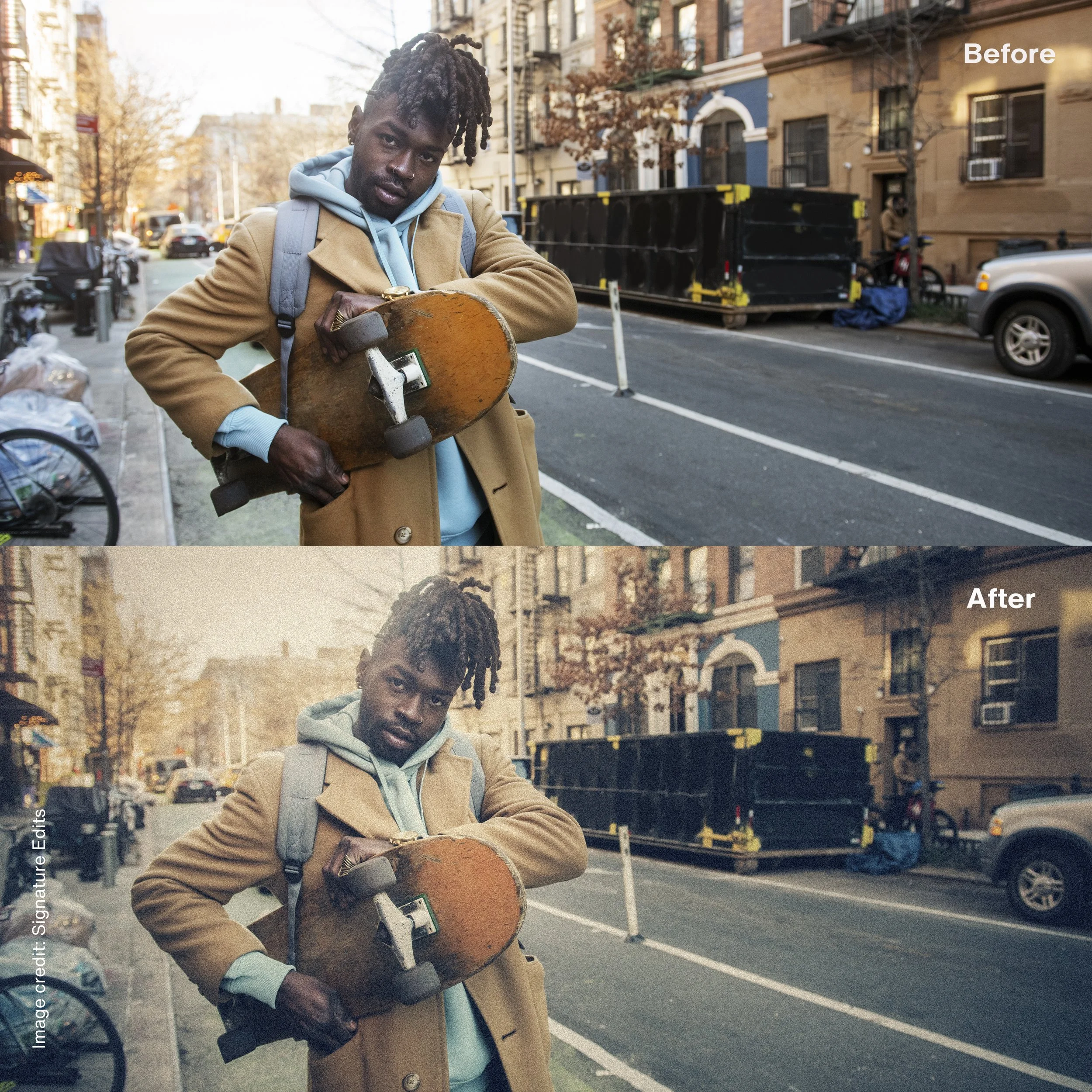

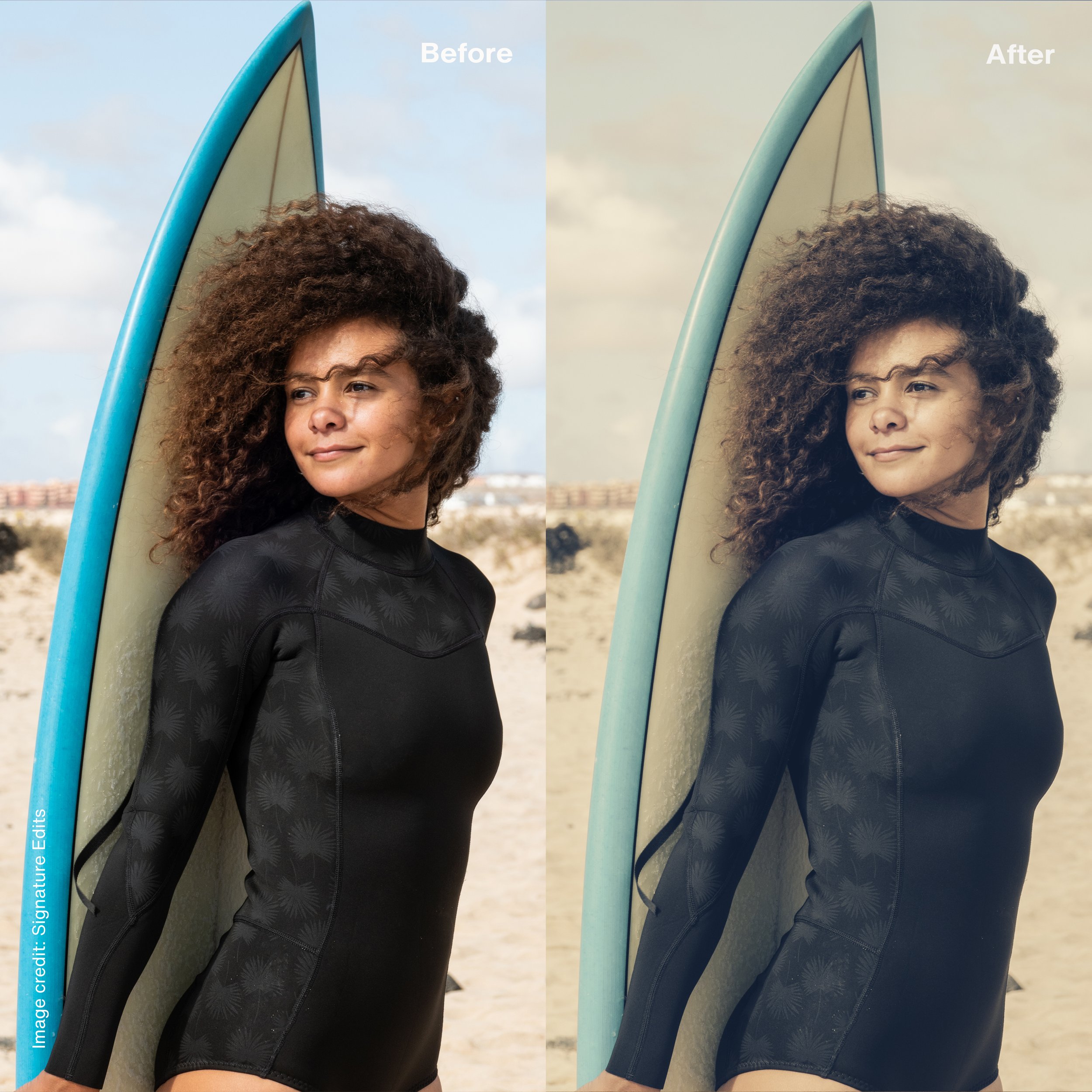

Bring the warmth and timeless character of classic film photography to your digital images with the Vintage Analogue Film Lightroom preset. This versatile preset carefully recreates the rich tones, subtle grain, and nostalgic color shifts of analogue film, ideal for adding a vintage aesthetic to portraits, street photography, travel shots, and more.
Designed to evoke a beautifully aged look, Vintage Analogue Film enhances highlights with a gentle fade, deepens shadows for added contrast, and applies just the right amount of muted saturation. Perfect for photographers seeking a sophisticated, retro finish, this preset transforms modern digital photos into evocative, analogue-inspired visuals, full of texture and mood.
What is in the pack?
15 Presets
3 Grain presets
3 Vignette presets
Remember! No preset can give you a perfect result with one click - depending on your camera, exposure, light, and composition the result will differ. Use the different tools inside Lightroom to adjust exposure and contrast and you will have a great result.
IMPORTANT NOTICE This Lightroom presets is compatible with Adobe Lightroom versions of:
Adobe Lightroom CC
Adobe Lightroom Classic
Adobe Photoshop CC (Camera Raw filter)
Adobe Lightroom Mobile App (you will need a Creative Cloud subscription to import the profiles. You can do this by importing through the Lightroom CC desktop app and they will appear in your mobile app)
Please make sure you have the correct software before your purchase - refunds can NOT be given for digital downloads. Also, make sure to update your Lightroom to the latest version, so it can handle the included profile. (Older versions of Lightroom might have problems finding profiles).
Rich and expressive color
The history of analogue photography is not a history of muted color. Many photographic materials and printing processes were capable of extraordinary saturation, density and color separation.
Dye transfer printing is one of the most remarkable examples. The process was known for its control and richness of color, and has a visual character quite different from conventional color printing.
Our Dye Transfer inspired tools take this history as a starting point for a denser and more expressive approach to digital color.
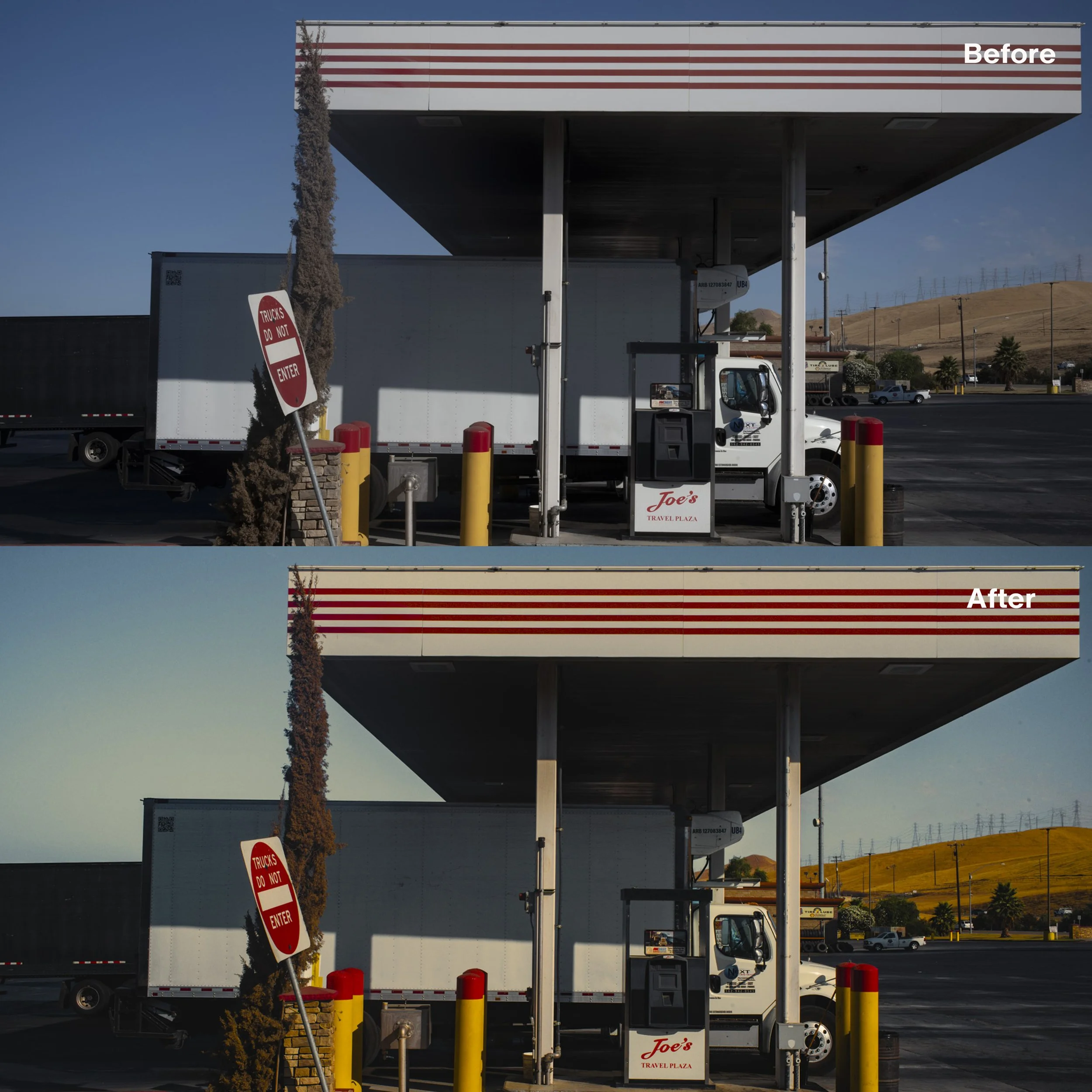

Dye transfer printing, popularized by legendary photographers like William Eggleston, was renowned for its vivid and richly saturated colors. Eggleston, known as the "Godfather of Color Photography," used this technique to create timeless masterpieces that still captivate audiences today.
The dye transfer technique, which originally was used for magazine and advertisement copy, is superior to all other processes because it has a wider color gamut and tone range and is far more spectrally pure than typical coupler-induced photographic dyes.
Inspired by the artistry of dye transfer prints and the legacy of photographers like William Eggleston, our Dye Transfer Lightroom preset infuses your digital photos with the same timeless allure.
What is in the pack?
13 custom presets
Remember No preset can give you a perfect result with one click - depending on your camera, exposure, light, and composition the result will differ. Use the different tools inside Lightroom to adjust exposure and contrast and you will have a great result.
IMPORTANT NOTICE This Lightroom presets is compatible with Adobe Lightroom versions of:
Adobe Lightroom CC
Adobe Lightroom Classic
Adobe Photoshop CC (Camera Raw filter)
Adobe Lightroom Mobile App (you will need a Creative Cloud subscription to import the profiles. You can do this by importing through the Lightroom CC desktop app and they will appear in your mobile app)
Please make sure you have the correct software before your purchase - refunds can NOT be given for digital downloads. Also, make sure to update your Lightroom to the latest version, so it can handle the included profile. (Older versions of Lightroom might have problems finding profiles).
When color moves away from reality
Photography has also been used to record parts of the spectrum that are invisible to the human eye. Kodak Aerochrome, originally developed for aerial surveillance and scientific applications, became famous for its transformation of vegetation into intense reds and pinks.
Its strange palette later found a place in art, fashion and documentary photography. Our Aero Infrared collection is inspired by this history and explores the possibilities of false-color photography within a digital workflow.


AERO INFRARED was created with inspiration from the Kodak Aerochrome film. Kodak Aerochrome was a false-color infrared film sensitive to the color spectrum and infrared light. Photographer Richard Mosse as well as fashion and art photographers used this film over the years.
Aero Infrared profile-based preset gives you that wonderful color palette from Aerochrome. The more green you have in the picture the more pink and red you get. With our black and white preset you get the best result with a heavy blue sky (see the example). The preset is skin tone safe.
What is in the pack?
Two specially designed profiles (portrait & landscape)
7 infrared presets for color pictures
2 infrared presets for black and white
Two grain presets - one for 35mm film look and one for 120mm film look.
Remember - You can adjust the amount of profile effect by pulling the profile slider in the develop panel (at the top). No preset can give you a perfect result with one click - depending on your camera, exposure, light, and composition the result will differ. Use the different tools inside Lightroom to adjust exposure and contrast and you will have a great result.
IMPORTANT NOTICE This Lightroom presets is compatible with Adobe Lightroom versions of:
Adobe Lightroom CC
Adobe Lightroom Classic
Adobe Photoshop CC (Camera Raw filter)
Adobe Lightroom Mobile App (you will need a Creative Cloud subscription to import the profiles. You can do this by importing through the Lightroom CC desktop app and they will appear in your mobile app)
Please make sure you have the correct software before your purchase - refunds can NOT be given for digital downloads. Also, make sure to update your Lightroom to the latest version, so it can handle the included profile. (Older versions of Lightroom might have problems finding profiles).
Presets, profiles and color
A Lightroom preset is essentially a collection of editing decisions. Depending on the individual collection, these decisions may involve tone curves, color adjustments, color grading, grain and other parameters.
Some of our collections also use custom profiles. Profiles work at a different level in Lightroom and allow us to develop color relationships that cannot always be created through the standard editing controls alone. When combined with the adjustments contained in a preset, they provide more flexibility in shaping the overall color response of an image.
The technical side of this process is important, but most of the work lies in testing and judgement.
We test our looks on portraits, landscapes, mixed lighting, deep shadows, pale northern light and strong summer sun. During development, a preset may look convincing on one photograph and fail completely on another. That is usually a sign that more work is needed.
A useful photographic tool needs to survive outside the photograph on which it was created.
Our approach to film emulation
We use the term film emulation with some caution.
A digital sensor and a photographic emulsion record light in fundamentally different ways. Film grain is a physical part of the image-forming process, while digital noise has another origin and structure. The appearance of an analogue photograph is also affected by exposure, development, chemistry, scanning and printing.
There is another aspect that is often overlooked. Most of us did not experience the history of film photography by examining negatives directly. We encountered photographs as darkroom prints, reproductions in magazines, books, exhibition prints, cinema stills, family albums and, later, scans of very different quality.
Our visual memory of film is therefore complicated. It contains both the characteristics of photographic materials and all the processes through which those photographs reached us.
This broader history is important to The Digital Darkroom. A particular film stock can provide the starting point for a collection, but so can a printing process, a darkroom technique or a certain period in the history of photographic color. We are interested in how these references can inform contemporary digital photography and become practical tools for photographers working today.
Working with the presets
Presets respond to the photograph they are applied to. Exposure, white balance, lighting conditions and the colors already present in the scene all influence the result. Different camera sensors also interpret color differently.
We recommend treating the preset as the beginning of the editing process. After applying a look, we usually start with exposure and white balance, then make smaller adjustments according to the photograph. Where a collection includes an adjustable profile, the profile amount can be used to make the underlying color character more subtle or pronounced.
This way of working is closer to how we approach editing ourselves. The preset establishes a set of color and tonal relationships, while the final decisions remain connected to the individual photograph.
Why film continues to matter
The continuing interest in film is sometimes described as a reaction against digital photography, but that explanation feels too simple.
Digital photography has given photographers extraordinary freedom. We can work faster, photograph in lower light and make technical adjustments with a degree of precision that was previously impossible. None of this has made the history of photographic materials irrelevant.
Photography has always evolved through a mixture of technology, limitation and individual interpretation. Every material introduced its own possibilities and restrictions, and photographers learned to work within them. Over time, these materials created distinct visual languages.
Many of those languages remain relevant because they concern fundamental photographic questions: how color creates atmosphere, how contrast directs attention, how texture affects our perception of an image and how technical choices influence emotional experience.
Film emulation is one way of continuing that conversation within digital photography.
Explore Film Emulation Presets for Lightroom
The Film Emulation collection brings together Lightroom presets and profiles inspired by analogue film, historic color processes and different traditions of photographic image-making.
The collections vary considerably in character. Some concentrate on restrained color and natural skin tones, while others explore stronger palettes, unusual processes and more experimental approaches to photographic color.
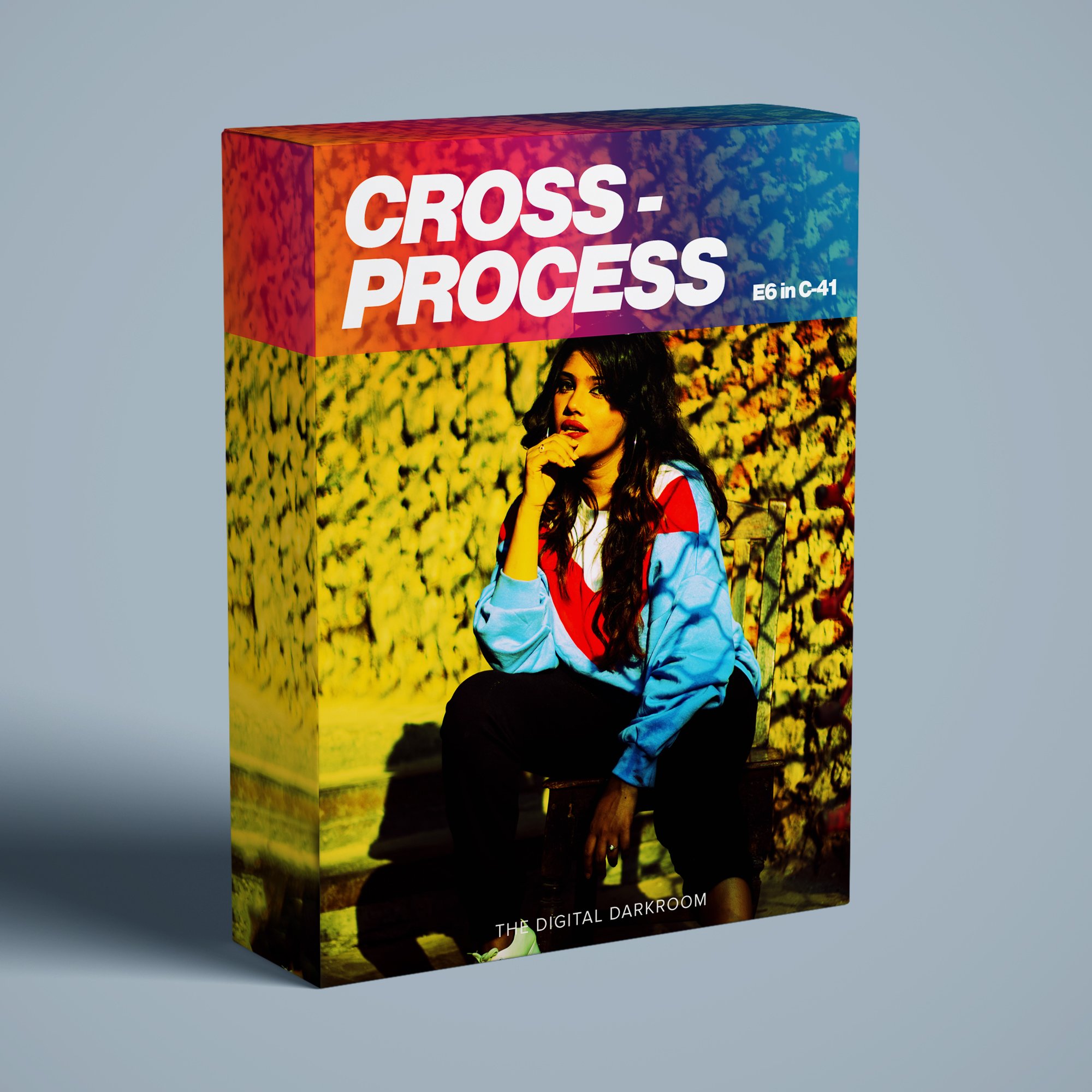
Cross Processing is the process where the photographer intentionally processing the film in the wrong chemicals, creating interesting and unpredictable color shifts and increased contrast. Used widely during the 90´s by fashion and music photographers. This set of profiles and presets imitates the effect of shooting slidefilm (E6) developed in C-41 (negative developer).
What is in the pack?
3 unique cross process profiles
15 custom presets
3 grain presets
Remember - You can adjust the amount of profile effect by pulling the profile slider in the develop panel (at the top). No preset can give you a perfect result with one click - depending on your camera, exposure, light, and composition the result will differ. Use the different tools inside Lightroom to adjust exposure and contrast and you will have a great result.
IMPORTANT NOTICE This Lightroom presets is compatible with Adobe Lightroom versions of:
Adobe Lightroom CC
Adobe Lightroom Classic
Adobe Photoshop CC (Camera Raw filter)
Adobe Lightroom Mobile App (you will need a Creative Cloud subscription to import the profiles. You can do this by importing through the Lightroom CC desktop app and they will appear in your mobile app)
Please make sure you have the correct software before your purchase - refunds can NOT be given for digital downloads. Also, make sure to update your Lightroom to the latest version, so it can handle the included profile. (Older versions of Lightroom might have problems finding profiles).
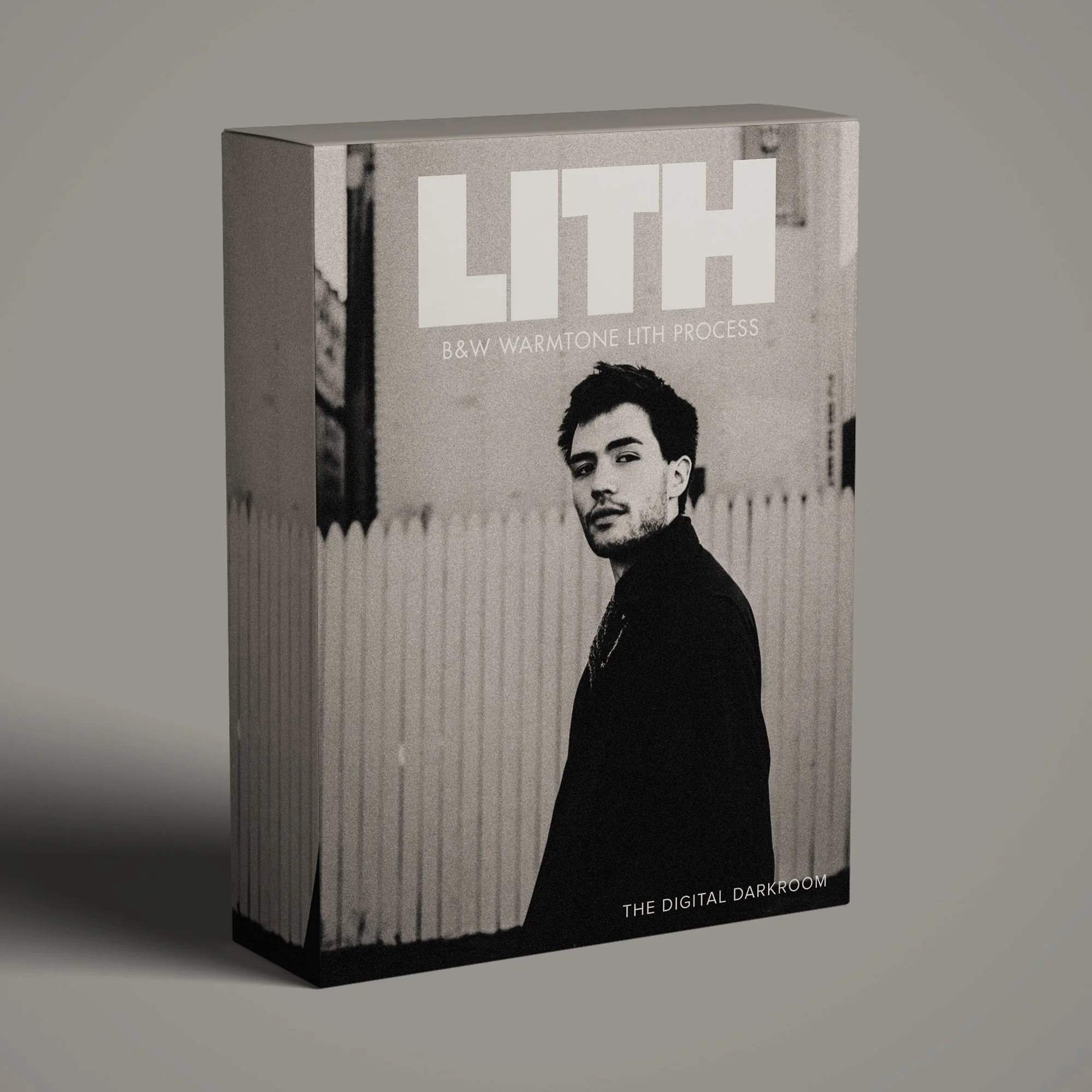
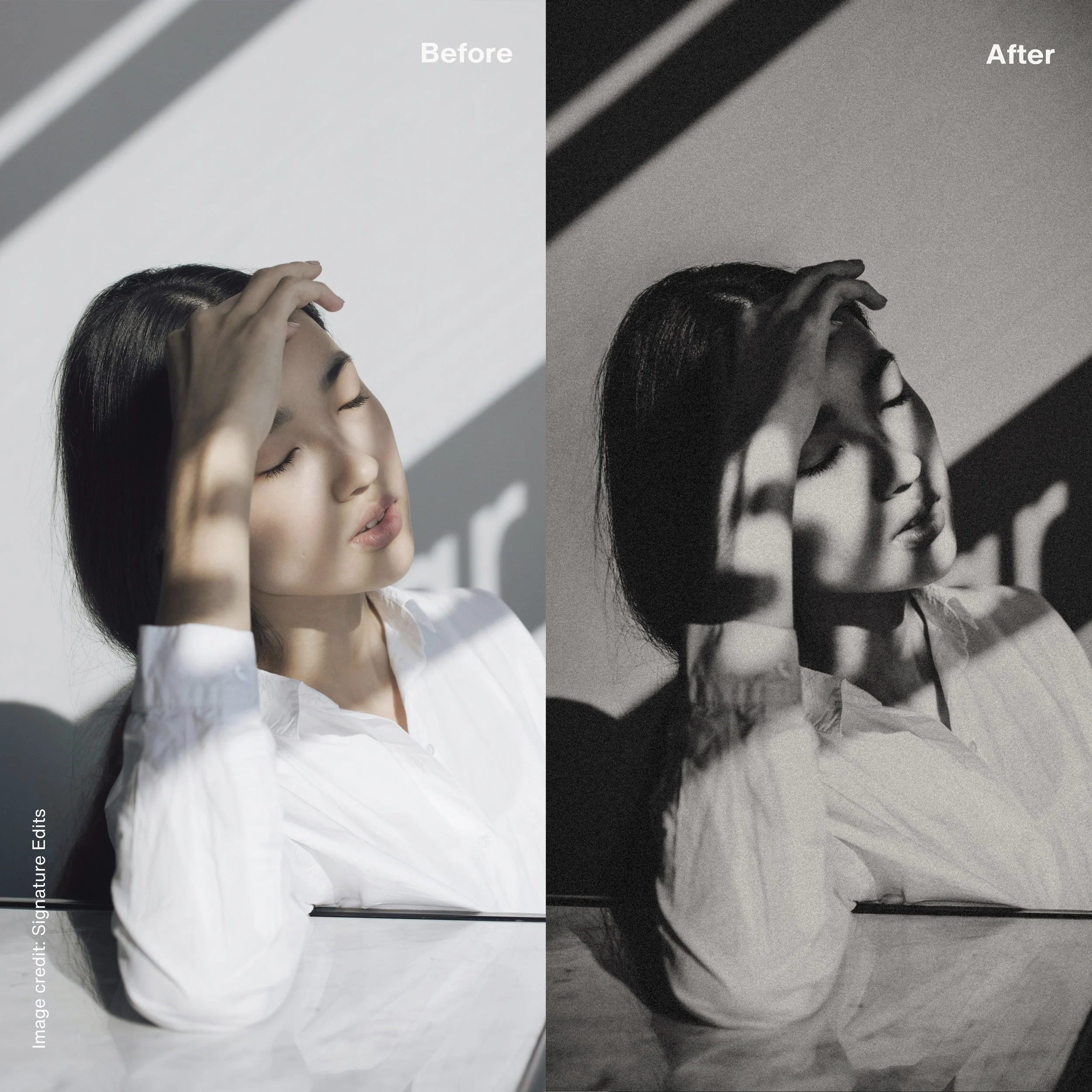
B&W Warmtone Lith Process. - a complex process based on a lithographic developer, creates this unique visual look. Lith printing - the holy grail for many photographers spending weeks in the darkroom trying to figure out the secret recipe. Hard black shadows, warm creamy highlights and generous amount of sharp grain.
We are so proud to announce our own take on Lith printing - our preset LITH gives you a fantastic tool for creating images that really stand out from the rest. Our preset pack is based on a handcrafted and well-tested LUT profile, an effect that can not be created in Lightroom alone.
Remember: Since our Lith profile is a color profile (in order to get right overlay color effect) it is not recommended to use the profile slider for changing the profile effect. Use instead the exposure and contrast sliders to get the right amount of the effect.
What is in the pack?
1 Lith profile
14 presets
5 Grain structures
4 Warm tones
Remember - No preset can give you a perfect result with one click - depending on your camera, exposure, light, and composition the result will differ. Use the different tools inside Lightroom to adjust exposure and contrast and you will have a great result.
IMPORTANT NOTICE This Lightroom presets is compatible with Adobe Lightroom versions of:
Adobe Lightroom CC
Adobe Lightroom Classic
Adobe Photoshop CC (Camera Raw filter)
Adobe Lightroom Mobile App (you will need a Creative Cloud subscription to import the profiles. You can do this by importing through the Lightroom CC desktop app and they will appear in your mobile app)
Please make sure you have the correct software before your purchase - refunds can NOT be given for digital downloads. Also, make sure to update your Lightroom to the latest version, so it can handle the included profile. (Older versions of Lightroom might have problems finding profiles).
We are excited to present the Digital Portra, a Lightroom preset inspired by the timeless beauty of Kodak Portra film.
After extensive research and experimentation, we have developed a product in which we have enormous confidence and which we are proud to bring to the photographic community.
Kodak Portra film has long been cherished by photographers for its ability to capture stunning portraits with natural skin tones, soft highlights, and fine grain. It's not just a film; it's an experience, a legacy that continues to inspire photographers worldwide. Digital Portra aims to encapsulate this essence and bring it to your digital photographs.
Whether you're a professional photographer or an enthusiast capturing memories, this preset is designed to enhance your portraits, adding a layer of sophistication and warmth that only classic film photography can offer.
Natural Skin Tones: Achieve lifelike skin tones that look as if they were captured on film.
Soft Highlights: Soften harsh highlights and create a gentle, dreamy atmosphere in your photos.
Fine Grain: Add a touch of subtle grain, reminiscent of classic film photography, enhancing the overall texture of your images.
Versatility: Suitable for a wide range of portrait styles, from family photos to professional portraits and lifestyle shots.
What is in the pack?
1 handcrafted Digital Portra profile
8 custom presets
160 NC, VC - normal and overexposed
400 NC, VC - normal and overexposed
Grain
Remember - You can adjust the amount of profile effect by pulling the profile slider in the develop panel (at the top). No preset can give you a perfect result with one click - depending on your camera, exposure, light, and composition the result will differ. Use the different tools inside Lightroom to adjust exposure and contrast and you will have a great result.
IMPORTANT NOTICE This Lightroom presets is compatible with Adobe Lightroom versions of:
Adobe Lightroom CC
Adobe Lightroom Classic
Adobe Photoshop CC (Camera Raw filter)
Adobe Lightroom Mobile App (you will need a Creative Cloud subscription to import the profiles. You can do this by importing through the Lightroom CC desktop app and they will appear in your mobile app)
Please make sure you have the correct software before your purchase - refunds can NOT be given for digital downloads. Also, make sure to update your Lightroom to the latest version, so it can handle the included profile. (Older versions of Lightroom might have problems finding profiles).

CHROMA The Kodachrome film was a true classic - For many years Kodachrome was widely used for professional color photography, especially for images intended for publication in print media. Our profile-based preset Chroma is inspired by that classic color palette of Kodakchrome and gives your photos that unique look - we believe it is close to the original.
What is in the pack?
2 Chroma profiles
9 presets
Two grain presets - one for daylight (with fine balanced grain) and one for night pictures (with heavier grain and brighter shadows)
Preset for adjusting the skin tone
Remember - You can adjust the amount of profile effect by pulling the profile slider in the develop panel (at the top). No preset can give you a perfect result with one click - depending on your camera, exposure, light, and composition the result will differ. Use the different tools inside Lightroom to adjust exposure and contrast and you will have a great result.
IMPORTANT NOTICE This Lightroom presets is compatible with Adobe Lightroom versions of:
Adobe Lightroom CC
Adobe Lightroom Classic
Adobe Photoshop CC (Camera Raw filter)
Adobe Lightroom Mobile App (you will need a Creative Cloud subscription to import the profiles. You can do this by importing through the Lightroom CC desktop app and they will appear in your mobile app)
Please make sure you have the correct software before your purchase - refunds can NOT be given for digital downloads. Also, make sure to update your Lightroom to the latest version, so it can handle the included profile. (Older versions of Lightroom might have problems finding profiles).
Dye transfer printing, popularized by legendary photographers like William Eggleston, was renowned for its vivid and richly saturated colors. Eggleston, known as the "Godfather of Color Photography," used this technique to create timeless masterpieces that still captivate audiences today.
The dye transfer technique, which originally was used for magazine and advertisement copy, is superior to all other processes because it has a wider color gamut and tone range and is far more spectrally pure than typical coupler-induced photographic dyes.
Inspired by the artistry of dye transfer prints and the legacy of photographers like William Eggleston, our Dye Transfer Lightroom preset infuses your digital photos with the same timeless allure.
What is in the pack?
13 custom presets
Remember No preset can give you a perfect result with one click - depending on your camera, exposure, light, and composition the result will differ. Use the different tools inside Lightroom to adjust exposure and contrast and you will have a great result.
IMPORTANT NOTICE This Lightroom presets is compatible with Adobe Lightroom versions of:
Adobe Lightroom CC
Adobe Lightroom Classic
Adobe Photoshop CC (Camera Raw filter)
Adobe Lightroom Mobile App (you will need a Creative Cloud subscription to import the profiles. You can do this by importing through the Lightroom CC desktop app and they will appear in your mobile app)
Please make sure you have the correct software before your purchase - refunds can NOT be given for digital downloads. Also, make sure to update your Lightroom to the latest version, so it can handle the included profile. (Older versions of Lightroom might have problems finding profiles).
Frequently Asked Questions
What are film emulation presets?
Film emulation presets are editing tools developed to give digital photographs color, tonal and textural characteristics associated with analogue photography. Different approaches may focus on the response of particular film stocks, scanned negatives, printing processes, grain structure or broader traditions within photographic color.
At The Digital Darkroom, we use analogue materials and processes as references when developing tools for contemporary digital photography.
Can a Lightroom preset make a digital photograph look exactly like film?
Film and digital photography are different recording processes, so an exact transformation is not really possible. The final appearance of an analogue photograph also depends on exposure, development, scanning or printing and many other variables.
A carefully developed combination of presets and profiles can nevertheless create color relationships, tonal behavior and texture informed by analogue photographic processes.
Do the presets work with RAW files?
RAW files provide the greatest flexibility when working with the presets because exposure, white balance and color can be adjusted extensively after the look has been applied.
Compatibility and software requirements can vary between collections, so we recommend checking the information on each individual product page.
Will a preset look the same on every photograph?
The result will vary according to the original image. Light, exposure, white balance, camera response and the colors present in the scene all influence how a preset behaves.
This is why we test the collections across many different kinds of photographs during development.
Can I adjust the presets after applying them?
Yes. All presets can be followed by further adjustments to exposure, white balance, contrast and other Lightroom controls. Collections that include adjustable profiles also allow the strength of the underlying profile to be changed.
The Digital Darkroom
The Digital Darkroom is an independent studio devoted to photographic color, film emulation and the visual language of the traditional darkroom.
The project grew from a long interest in the relationship between photographic materials and the final image: film stocks, printing processes, darkroom techniques and the many ways photographs change as they move between different media.
Our presets and profiles are developed as practical tools for photographers who want to explore these traditions within a contemporary digital workflow.